The first time you open the app
Nexus Contacts opens with four short screens: a welcome, a screen about your contacts, one for setting up your own card, and a confirmation. Skip Setup on the first screen takes you past all of them.
Access Your Contacts
The second screen is the only one that asks for a permission, and it asks for one: access to your contacts. It explains what the access is for — saving people you meet straight to your contacts, linking a capture to someone already there, and filling in your own card — and gives you two buttons: Allow Access and Not Now.
Tapping Allow Access is what brings up the iOS permission dialog. Tapping Not Now asks for nothing, and moves on.
Not Now is a real answer. The rest of setup works without contacts access — you can type your own card by hand — and you can finish the whole flow having granted nothing. If you change your mind later, the app asks again at the point where it needs the access, and if you say no there it does not ask again.
Nothing else is requested here
The camera, your photos, your location, your calendar and notifications are not requested during setup. Each is asked for later, at the moment you do something that needs it.
The last screen
The final screen confirms you are set up and moves on by itself after a moment. You do not have to tap anything.
Your wall: People You've Met
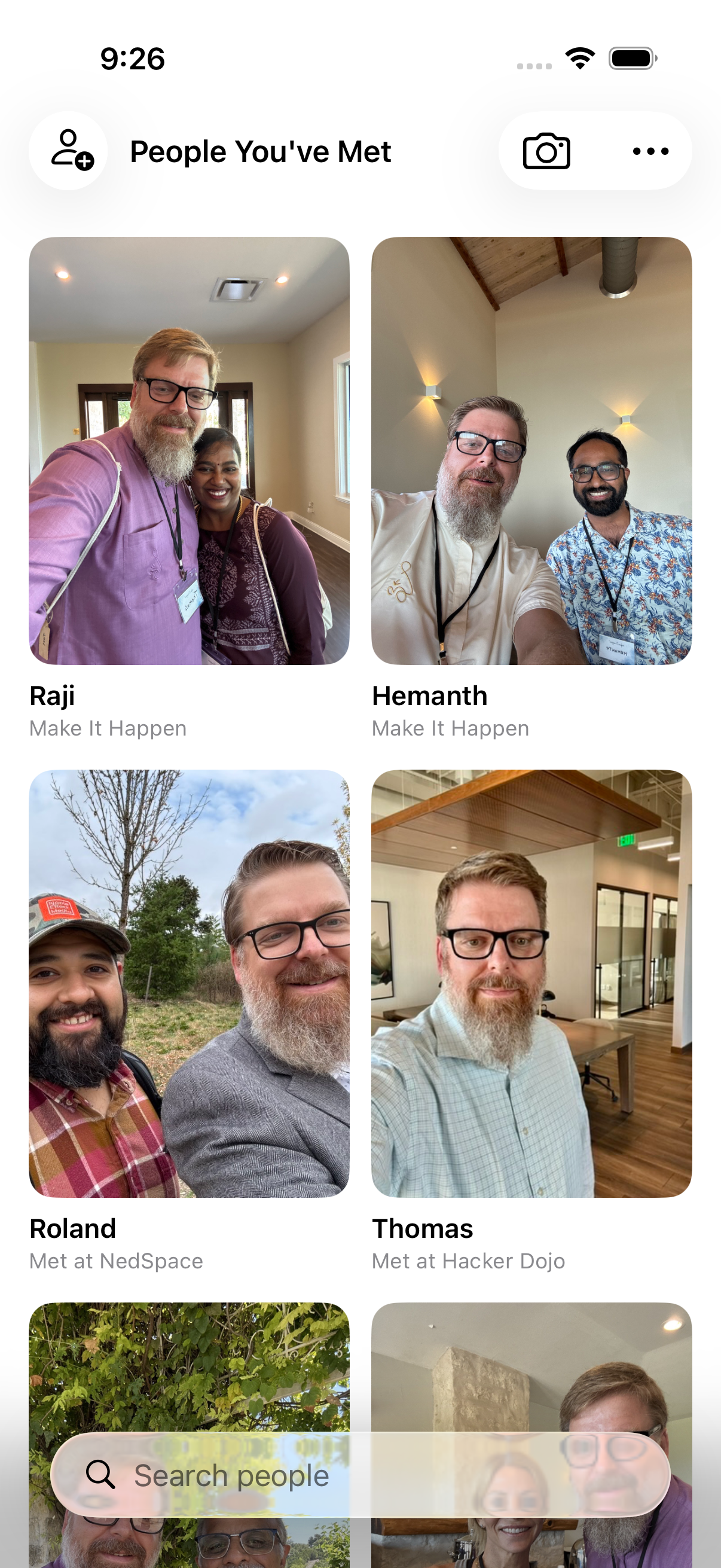
Home is a wall of faces — one tile per person you've met, with where and when you met them.
- Tap any face to see everything you remembered: the place, the event, and your journal
- The camera button starts a capture — selfie, a line about them, done
- "I'm at an event…" tags every capture with the event until you end it
How to add a contact manually
Tap "New Contact" on the dashboard to create a contact directly. Add their name, phone number, email, and any notes you want to remember.
You can also add a photo and tag the event where you met — all in one step.
Scan a business card
Photograph a card and the app reads it into a new contact — position the card in frame and it does the rest. If the camera has not been allowed yet, it asks.
You can also attach a card to someone you already have. Add Business Card on their page keeps the card itself alongside everything else you remembered about them.
The reading happens on your device, through Apple's Vision framework. The card image and the text it produces never go to a server.
Ask Siri
Things that work by voice without opening the app. Say them as written — Siri matches the phrase, so a paraphrase may not land.
- "Log a call with [name] in Nexus Contacts" — or Record meeting with…, Log interaction with…
- "Add note to [name] in Nexus Contacts" — or Note about…, Remember about…
- "Remind me to follow up with [name] in Nexus Contacts" — or Set reminder for…, Follow up with…
- "New selfie contact in Nexus Contacts" — or Take a selfie in…, Meet someone in…
- "Scan a business card in Nexus Contacts" — or Scan card in…, Read business card in…
Log a call, Add note and their variations all write to that person's journal — there is no separate call log. The logging phrases record what kind it was — a call, a text, an email, a meeting or a coffee — and the minutes if you give them. The first three take a name from your phone contacts, not only the people on your wall, and Siri asks which one if the name matches more than one person.
Your existing contacts
Nexus Contacts starts empty. Your wall fills with people you add here: someone you captured, someone who shared their card with you, a business card you scanned, or a backup you restored. Your existing contacts do not appear on it.
Nexus Contacts reads your address book to find names you already have: linking someone to a contact you have, picking a companion to share alongside you, offering suggestions to Siri and Shortcuts. Those reads happen on your device. If you ask Siri to add a note about someone, that person is added to your wall too — but only people you capture count toward your free hundred, and anything saved syncs through your own iCloud when you have it turned on.
If this page doesn't answer it, email support@commonnexus.com. A person reads it.